# 7.1.3 Calendar View
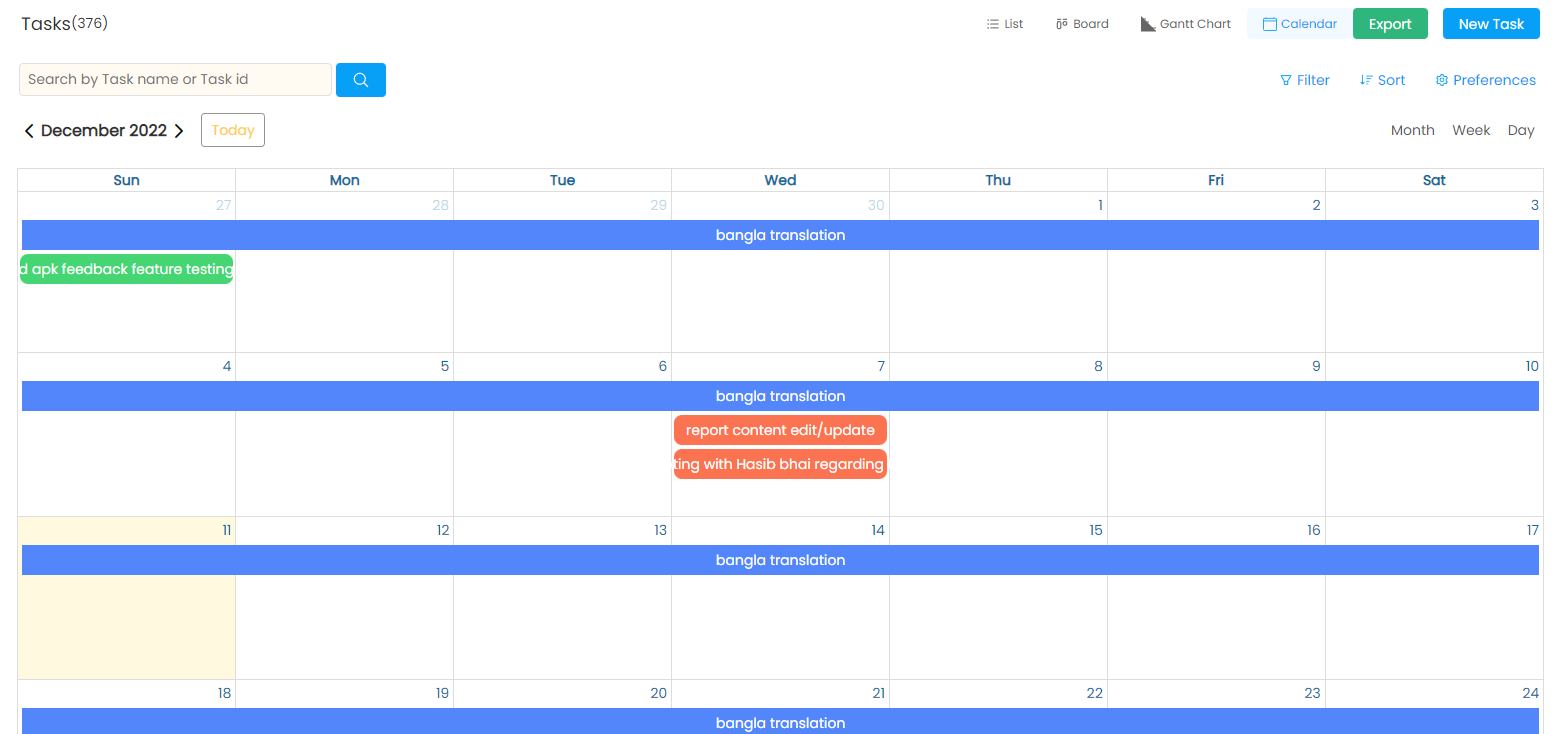
The "Calendar View" feature provides users with a visual representation of all project-related activities and events. It allows team members to view their tasks, milestones, deadlines, and other project-related activities in a calendar format.
The feature displays all the events and activities associated with a project, including scheduled tasks, deadlines, meetings, appointments, and milestones. Users can easily view the project schedule, identify upcoming events, and plan their work accordingly.
In the calendar view, you can see the duration of a task through days. You can search by month, week or day.
Clicking on a specific task will open the modal of that task for further actions.
Calendar View
---
# Agent Instructions: Querying This Documentation
If you need additional information that is not directly available in this page, you can query the documentation dynamically by asking a question.
Perform an HTTP GET request on the current page URL with the `ask` query parameter:
```
GET https://docs.onethreadapp.com/5.-managing-project/5.2-project-dashboard/7.1-different-views-for-item/7.1.3-calendar-view.md?ask=
```
The question should be specific, self-contained, and written in natural language.
The response will contain a direct answer to the question and relevant excerpts and sources from the documentation.
Use this mechanism when the answer is not explicitly present in the current page, you need clarification or additional context, or you want to retrieve related documentation sections.